

We will see a workaround to use Render Queue and VFB together as they are not integrated at the moment.
First thing do all your test renders and if you have different VFB layers for every render then save your vfbl file for every one.

Go to Render Settings – Vray
Under Common Select “Use V-ray output System” and Deselect “Apply VFB Compositing”.
Choose the file name and as format vrimg

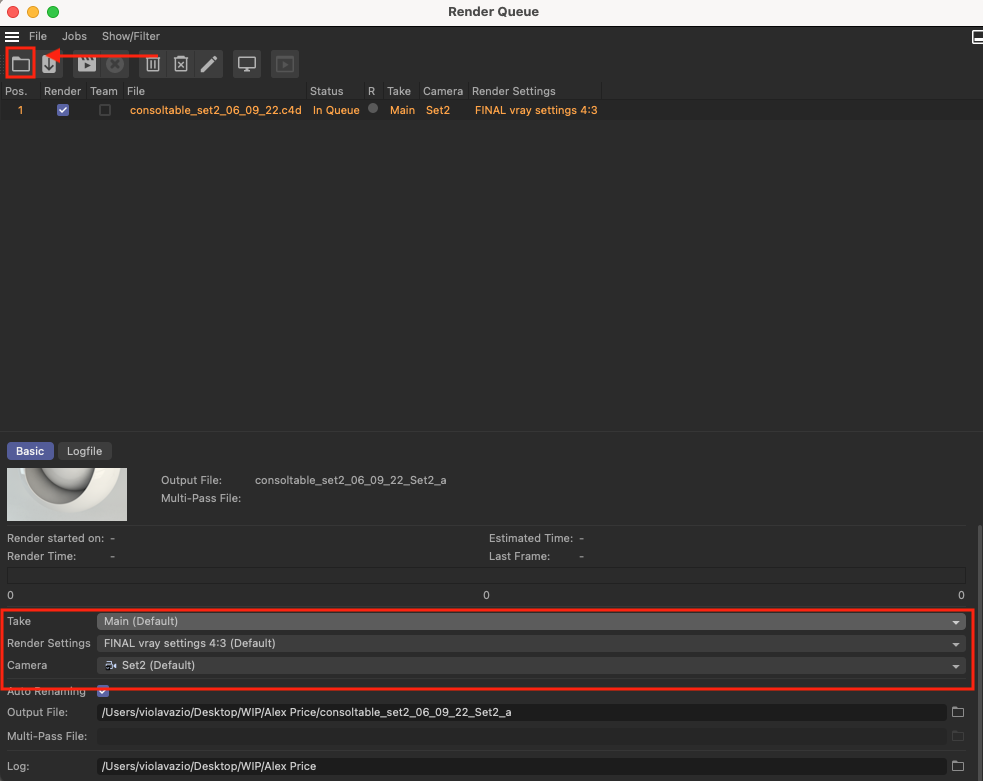
Render – Render Queue
Open all the files you want to batch render and at the bottom make sure to select the take if you have used one otherwise just leave Main (default)
Choose the Render settings and Camera
Once you are ready click on Start Rendering

Once all you renders have been completed, open VFB window
-Load image and the on the right click on load layer (the vfbl file you saved at the beginning)
If needed you can also modify the layers inside the VFB
Save your file in whatever format you prefer.

Many more topics are coming soon so if you wish te receive our blog posts right in your inbox make sure to subscribe to our newsletter so that we’ll keep you updated.
Best place to share your renders and chat is our Discord server https://discord.gg/jcdBxDbXYC so come join us!
We also offer private Coaching for those that need help with their projects.